Canon SELPHY & HP Sprocket share many similarities, but there are also important differences, such as quality, performance, features, design, and connectivity. If you want the best one between them, I Would recommend the Canon SELPHY rather than the HP Sprocket.
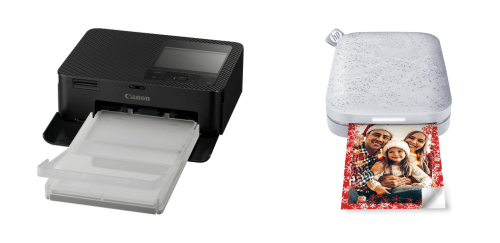
Why Do I Recommend The Canon SELPHY?
- The Canon SELPHY uses dye-sublimation printing technology to produce smoother gradients, richer colors, and more accurate skin tones in photo prints, while the HP Sprocket uses ZINK thermal printing.
- Canon SELPHY supports larger 4×6-inch photo printing to create standard frame-ready prints suitable for albums and displays, whereas HP Sprocket is limited to 2×3-inch prints.
- It includes a protective overcoat layer for improving scratch resistance, moisture protection, and long-term durability of printed photos, while HP Sprocket does not include a protective coating.
- The Canon SELPHY has a built-in LCD screen for previewing photos, adjusting layouts, and selecting print settings directly on the device, whereas the HP Sprocket has no display.
- Canon SELPHY supports standalone printing from memory cards and USB drives for printing photos without relying on a smartphone or app, while HP Sprocket requires a mobile device for all printing tasks.
- It supports PC and Mac connectivity to enable batch printing, archival photo printing, and desktop-based workflows, while HP Sprocket does not support computer printing.
- The Canon SELPHY features higher photo longevity ratings for preserving color accuracy and image quality for decades, whereas HP Sprocket does not specify long-term print longevity.
- Canon SELPHY has a lower cost per print when using bundled paper-and-ink cartridges for frequent photo printing, while HP Sprocket uses higher-cost ZINK paper per photo.
Maybe the HP Sprocket can make you comfortable because it’s a little bit cheaper than the Canon SELPHY. But you have to compromise all the above-mentioned features. Now the Decision is Yours. I hope it was helpful to choose the right one.
Side-by-Side Comparison
| Feature | Canon SELPHY | HP Sprocket |
| Print technology | Dye-sublimation | ZINK thermal |
| Ink usage | Ink + ribbon cartridge | No ink |
| Paper type | Canon photo paper | ZINK sticky paper |
| Maximum print size | 4×6 in | 2×3 in |
| Color depth | 256-level per color | ZINK crystal based |
| Print finish | Glossy / semi-gloss | Matte |
| Print longevity rating | ~100 years | Not specified |
| Display screen | Built-in LCD | None |
| Physical controls | Buttons / D-pad | Power only |
| Standalone printing | Yes | No |
| Memory card slot | SD / microSD | None |
| USB flash support | Yes | No |
| PC/Mac support | Yes | No |
| Mobile OS dependency | Optional | Mandatory |
| Connectivity primary | Wi-Fi | Bluetooth |
| Battery type | Optional external | Built-in internal |
| Battery replaceable | Yes | No |
| Prints per charge | ~54 | ~35 |
| Device size class | Compact tabletop | |
| Paper loading method | Cartridge tray | Rear feed |
| Border options | Adjustable | Fixed |
| Photo coating | Protective overcoat | None |
| Price | Check Canon SELPHY Price | Check HP Sprocket Price |
What Common Both Can Do?
- Photo printer category: Both devices are compact photo printers designed specifically for printing images rather than documents. This focus allows each printer to optimize color handling and photo-centric workflows.
- Color photo printing: Canon SELPHY and HP Sprocket both support full-color photo output. This ensures users can print vibrant images instead of monochrome or limited-color prints.
- Borderless printing: Each printer supports borderless photo printing, allowing images to fill the entire paper surface. This produces cleaner, frame-ready photos without white margins.
- Wireless connectivity: Both models use wireless connections to receive print jobs. This removes the need for constant wired connections and improves ease of use in casual environments.
- Smartphone printing support: Canon SELPHY and HP Sprocket can both print directly from smartphones. This makes them convenient for users who primarily store photos on mobile devices.
- Companion mobile app: Each printer relies on a dedicated mobile app for image selection and basic adjustments. The app-based workflow simplifies printing and keeps the user experience consistent.
- JPEG image support: Both printers support standard JPEG image files. This ensures compatibility with most cameras, smartphones, and social media platforms.
- Social media photo printing: Canon SELPHY and HP Sprocket allow printing photos sourced from social media or cloud albums. This makes it easy to turn shared digital moments into physical prints.
- Portable design: Both devices are designed to be portable rather than fixed desktop printers. This enables flexible use at home, gatherings, or small events.
- Battery-powered operation: Each printer can operate on battery power. This allows printing without relying on a wall outlet at all times.
- Home use support: Canon SELPHY and HP Sprocket are suitable for home environments. Their size and noise levels make them practical for everyday personal use.
- Event/casual use support: Both printers are commonly used for parties, family events, or casual photo sharing. Their quick setup and simple operation support spontaneous printing.
- Manual paper loading: Each printer requires users to manually load photo paper. This keeps the hardware compact and easy to manage.
- Automatic print processing: Both devices handle printing automatically once a photo is sent. Users do not need to adjust print passes or color layers manually.
- No lamination required: Neither printer requires separate lamination steps after printing. The photos are ready to handle immediately once printing finishes.
- Consumer-focused workflow: Canon SELPHY and HP Sprocket are designed for everyday consumers rather than professional studios. Their interfaces prioritize simplicity over advanced manual controls.
- Instant photo output: Both printers produce physical photos within seconds. This quick turnaround enhances sharing and enjoyment during social moments.
Common Features
| Feature | Canon SELPHY | HP Sprocket |
| Photo printer category | Yes | Yes |
| Color photo printing | Yes | Yes |
| Borderless printing | Yes | Yes |
| Wireless connectivity | Yes | Yes |
| Smartphone printing support | Yes | Yes |
| Companion mobile app | Yes | Yes |
| JPEG image support | Yes | Yes |
| Social media photo printing | Yes | Yes |
| Portable design | Yes | Yes |
| Battery-powered operation | Yes | Yes |
| Home use support | Yes | Yes |
| Event/casual use support | Yes | Yes |
| Manual paper loading | Yes | Yes |
| Automatic print processing | Yes | Yes |
| No lamination required | Yes | Yes |
| Consumer-focused workflow | Yes | Yes |
| Instant photo output | Yes | Yes |
| Price | Check Canon SELPHY Price | Check HP Sprocket Price |
FAQ
Do Canon SELPHY and HP Sprocket print in color? Can both printers print photos wirelessly from a phone? Do Canon SELPHY and HP Sprocket require a mobile app? Are the prints borderless on both printers? Can both printers be used without being plugged into a wall outlet? Are Canon SELPHY and HP Sprocket considered portable printers? Do both printers support standard photo file formats? Can photos from social media be printed on both printers? Are these printers suitable for casual home use? Can both printers be used at parties or small events? Do both printers process prints automatically once a photo is sent? Is special post-processing required after printing photos? Are Canon SELPHY and HP Sprocket designed for professional photography? Do both printers focus on convenience rather than advanced manual controls? |