Samsung SSD 9100 Pro vs 990 Pro – Check Which One Is Best & Why?

Samsung SSD 9100 PRO & Samsung 990 PRO share many similarities, but there are also important differences, such as quality, performance, features, design, and connectivity. If you want the best one between them, I Would recommend the Samsung SSD 9100 PRO rather than the Samsung 990 PRO.
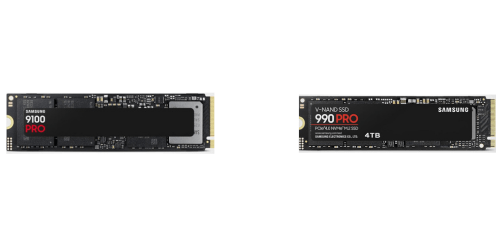
Why Do I Recommend The Samsung SSD 9100 PRO?

  • The Samsung SSD 9100 Pro has a PCIe 5.0 x4 interface for dramatically higher bandwidth and faster data transfers in next-generation systems, while the Samsung 990 Pro uses a PCIe 4.0 x4 interface.
  • Samsung SSD 9100 Pro features up to 14,800 MB/s sequential read speeds for significantly faster large file access and reduced load times, whereas the Samsung 990 Pro reaches up to 7,450 MB/s sequential read speeds.
  • It includes up to 13,400 MB/s sequential write speeds to accelerate heavy write workloads like 8K video editing and large dataset exports, while the Samsung 990 Pro is limited to up to 6,900 MB/s sequential write speeds.
  • The Samsung SSD 9100 Pro supports up to 8TB capacities to store massive game libraries and professional media projects on a single drive, while the Samsung 990 Pro supports up to 4TB.
  • Samsung SSD 9100 Pro supports up to 2.2 million IOPS read performance to enable faster multitasking and database-heavy workloads, while the Samsung 990 Pro reaches lower peak random read IOPS.
  • It achieves up to 2.6 million random write IOPS to improve responsiveness during intensive write-heavy operations, whereas the Samsung 990 Pro delivers lower maximum random write IOPS.
  • The Samsung SSD 9100 Pro comes with LPDDR4X DRAM cache for improved power efficiency and sustained performance during long workloads, while the Samsung 990 Pro uses LPDDR4 DRAM cache.
  • Samsung SSD 9100 Pro is built for PCIe 5.0 platforms to provide longer-term upgrade headroom and compatibility with future hardware standards, while the Samsung 990 Pro is designed around PCIe 4.0 platforms.

Maybe the Samsung 990 PRO can make you comfortable because it’s a little bit cheaper than the Samsung SSD 9100 PRO. But you have to compromise all the above-mentioned features. Now the Decision is Yours. I hope it was helpful to choose the right one.

Side-by-Side Comparison

FeatureSamsung SSD 9100 PROSamsung 990 PRO
PCIe interfacePCIe 5.0 x4PCIe 4.0 x4
Max capacity in lineup8TB4TB
DRAM typeLPDDR4XLPDDR4
DRAM cache (8TB model)8GBN/A
Sequential read (max)Up to 14,800 MB/sUp to 7,450 MB/s
Sequential write (max)Up to 13,400 MB/sUp to 6,900 MB/s
Sequential read (1TB)14,700 MB/s7,450 MB/s
Sequential write (1TB)13,300 MB/s6,900 MB/s
Sequential read (2TB)14,700 MB/s7,450 MB/s
Sequential write (2TB)13,400 MB/s6,900 MB/s
Random read (max, high queue)Up to 2,200K IOPSUp to 1,600K IOPS
Random write (max, high queue)Up to 2,600K IOPSUp to 1,550K IOPS
Random test point (listed)QD256 / Thread 32QD32 / Thread 16 and QD1 / Thread 1
Active power read (1TB avg.)7.6 W5.5 W
Active power write (1TB avg.)7.2 W5.2 W
Active power read (2TB avg.)8.1 W6.1 W
Active power write (2TB avg.)7.9 W5.5 W
Active power read (4TB avg.)9.0 W6.5 W
Active power write (4TB avg.)8.2 W5.7 W
PriceCheck SSD 9100 PRO PriceCheck 990 PRO Price

What Common Both Can Do?

  • Form factor: Both SSDs use the standard M.2 2280 form factor, ensuring compatibility with the vast majority of modern desktops and laptops. This makes installation straightforward without requiring adapters or special mounting hardware.
  • Interface type: Each drive connects via a PCIe x4 interface, allowing them to fully utilize multiple PCIe lanes for high data throughput. This shared interface standard ensures broad motherboard support across recent platforms.
  • NVMe support: Both models support the NVMe 2.0 specification, which improves command efficiency and latency compared to older storage protocols. This matters for faster boot times, quicker application launches, and smoother multitasking.
  • NAND technology: Samsung uses its own TLC V-NAND flash in both drives, balancing performance, endurance, and cost. TLC NAND provides strong sustained speeds while maintaining good write durability for everyday and professional workloads.
  • DRAM cache: Each SSD includes dedicated DRAM cache to store mapping tables. This improves random read and write performance and helps maintain consistent speeds under heavy workloads.
  • Hardware encryption: Both drives support AES 256-bit hardware encryption, enabling secure data protection without relying on software-based solutions. This is important for users handling sensitive or confidential data.
  • TCG Opal support: Support for TCG Opal allows both SSDs to integrate with enterprise-grade and OS-level encryption systems. This feature is useful for secure boot environments and managed systems.
  • IEEE 1667 support: Both models comply with IEEE 1667, enabling seamless compatibility with Microsoft eDrive and Windows BitLocker. This simplifies full-disk encryption setup for Windows users.
  • SMART support: Each SSD supports SMART monitoring, allowing users to track drive health, temperature, and remaining lifespan. This helps prevent unexpected data loss by identifying issues early.
  • TRIM support: TRIM support is present on both drives, helping the operating system inform the SSD which blocks are no longer in use. This maintains long-term performance and reduces unnecessary write amplification.
  • Garbage collection: Both SSDs use internal garbage collection to manage unused data blocks. This ensures consistent performance even after long periods of heavy use.
  • Samsung Magician support: Each drive is fully supported by Samsung Magician software for firmware updates, performance optimization, and health monitoring. This gives users centralized control and maintenance tools.
  • Over-provisioning support: Both SSDs allow user-defined over-provisioning to reserve extra NAND capacity. This can improve sustained performance and extend drive lifespan.
  • Wear-leveling: Advanced wear-leveling algorithms are used in both models to evenly distribute writes across NAND cells. This helps maximize endurance and reliability over time.
  • Thermal protection: Samsung’s Dynamic Thermal Guard technology is present in both drives to manage operating temperatures. This prevents thermal throttling and protects the SSD from heat-related damage.
  • Backward compatibility: Both SSDs are backward compatible with older PCIe generations. This allows them to function in a wide range of systems, even if full performance cannot be reached on older platforms.
  • Target usage: Samsung positions both drives for consumer and enthusiast use, including gaming, content creation, and high-performance computing tasks. This shared focus reflects similar expectations for reliability and premium performance.

Common Features

FeatureSamsung SSD 9100 PROSamsung 990 PRO
Form factorM.2 2280M.2 2280
Interface typePCIe x4PCIe x4
NVMe supportNVMe 2.0NVMe 2.0
NAND technologySamsung V-NAND (TLC)Samsung V-NAND (TLC)
DRAM cacheYesYes
Hardware encryptionAES 256-bitAES 256-bit
TCG Opal supportYesYes
IEEE 1667 supportYesYes
SMART supportYesYes
TRIM supportYesYes
Garbage collectionYesYes
Samsung Magician supportYesYes
Over-provisioning supportYesYes
Wear-levelingYesYes
Thermal protectionDynamic Thermal GuardDynamic Thermal Guard
Backward compatibilityPCIe backward compatiblePCIe backward compatible
Target usageConsumer / EnthusiastConsumer / Enthusiast
Price Check SSD 9100 PRO Price
Check 990 PRO Price

FAQ

Will Samsung SSD 9100 Pro work on a PCIe 4.0 motherboard?
Yes, Samsung SSD 9100 Pro is backward compatible with PCIe 4.0 systems, but it will run at PCIe 4.0 speeds rather than full PCIe 5.0 performance.

Is Samsung 990 Pro compatible with PCIe 5.0 slots?
Yes, Samsung 990 Pro can be installed in a PCIe 5.0 slot, but it will still operate at PCIe 4.0 speeds because the drive itself is Gen4.

Which SSD is better for future-proofing a new PC build?
Samsung SSD 9100 Pro is more future-proof because it supports PCIe 5.0, which is expected to become more common in upcoming platforms.

Do both SSDs use the same type of NAND flash?
Yes, both Samsung SSD 9100 Pro and Samsung 990 Pro use Samsung V-NAND TLC flash, which balances performance, endurance, and cost.

Do both drives include DRAM cache?
Yes, both models include dedicated DRAM cache, which improves sustained performance and random access speeds compared to DRAM-less SSDs.

Which SSD consumes more power under load?
Samsung SSD 9100 Pro consumes more power during active read and write operations due to its higher performance ceiling, while Samsung 990 Pro is more power-efficient overall.

Are both SSDs suitable for gaming?
Yes, both SSDs are excellent for gaming, offering fast load times and smooth asset streaming, though Samsung SSD 9100 Pro provides more headroom for future games optimized for faster storage.

Is there a capacity difference between the two models?
Yes, Samsung SSD 9100 Pro is available in capacities up to 8TB, while Samsung 990 Pro currently tops out at 4TB.

Do both SSDs support hardware encryption?
Yes, both drives support AES 256-bit hardware encryption along with TCG Opal and IEEE 1667 standards for secure data protection.

Can both SSDs be managed using Samsung Magician software?
Yes, Samsung Magician fully supports both models for firmware updates, performance optimization, health monitoring, and secure erase functions.

Do these SSDs require a heatsink?
Neither drive strictly requires a heatsink for basic operation, but a heatsink is recommended for sustained workloads, especially for Samsung SSD 9100 Pro due to higher thermal output.

Are both SSDs suitable for laptops?
Samsung 990 Pro is generally better suited for laptops because of its lower power consumption, while Samsung SSD 9100 Pro is more ideal for desktops with stronger cooling.

Do both SSDs support TRIM and SMART features?
Yes, both drives support TRIM and SMART, allowing the operating system to maintain performance and enabling users to monitor drive health and lifespan.

Which SSD is the better choice for professional workloads like video editing?
Samsung SSD 9100 Pro is the better choice for heavy professional workloads that benefit from extremely high sequential speeds, while Samsung 990 Pro remains more than sufficient for most creators and advanced users.

Scroll to Top