GeForce RTX 4060 Ti & GeForce RTX 2080 Ti share many similarities, but there are also important differences, such as quality, performance, features, design, and connectivity. If you want the best one between them, I Would recommend the GeForce RTX 4060 Ti rather than the GeForce RTX 2080 Ti.
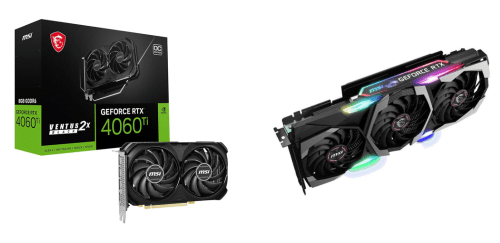
Why Do I Recommend The GeForce RTX 4060 Ti?
- The GeForce RTX 4060 Ti comes with the Ada Lovelace architecture for significantly higher performance per watt and cooler operation in modern gaming systems, while the GeForce RTX 2080 Ti uses the older Turing architecture.
- GeForce RTX 4060 Ti features 3rd-generation ray tracing cores to deliver smoother and more efficient real-time lighting and reflections in supported games, whereas the GeForce RTX 2080 Ti comes with 1st-generation ray tracing cores.
- It includes 4th-generation Tensor cores for faster AI workloads and improved upscaling accuracy, while the GeForce RTX 2080 Ti uses 2nd-generation Tensor cores.
- The GeForce RTX 4060 Ti supports DLSS 3 with frame generation to dramatically increase frame rates in CPU-limited and demanding titles, while the GeForce RTX 2080 Ti supports only DLSS 2 without frame generation.
- GeForce RTX 4060 Ti has a much larger L2 cache for reduced memory latency and better efficiency at high resolutions, whereas the GeForce RTX 2080 Ti relies on a smaller L2 cache.
- It includes AV1 hardware encoding for higher video quality at lower bitrates in streaming and content creation, while the GeForce RTX 2080 Ti lacks native AV1 encoding support.
- The GeForce RTX 4060 Ti operates at a significantly lower power draw to reduce electricity usage and thermal output in compact or quiet PC builds, whereas the GeForce RTX 2080 Ti consumes considerably more power.
- GeForce RTX 4060 Ti supports PCIe 4.0 for improved data transfer efficiency on modern platforms, while the GeForce RTX 2080 Ti uses PCIe 3.0.
Maybe the GeForce RTX 2080 Ti price can make you comfortable because it’s a little bit cheaper than the GeForce RTX 4060 Ti. But you have to compromise all the above-mentioned features. Now the Decision is Yours. I hope it was helpful to choose the right one.
Side By Side Comparison
| Feature | GeForce RTX 4060 Ti | GeForce RTX 2080 Ti |
| Architecture | Ada Lovelace | Turing |
| GPU Codename | AD106 | TU102 |
| Series Generation | RTX 40 Series | RTX 20 Series |
| Base Clock | ~2310 MHz | ~1350 MHz |
| Boost Clock | ~2535 MHz | ~1545 MHz |
| VRAM Capacity | 8 GB / 16 GB | 11 GB |
| L2 Cache | 32 MB | 5.5 MB |
| DLSS Version | DLSS 3 | DLSS 2 |
| Frame Generation | Supported | Not Supported |
| NVENC Version | 8th Gen | 7th Gen |
| AV1 Encode | Yes | No |
| PCIe Interface | PCIe 4.0 x8 | PCIe 3.0 x16 |
| Typical Board Power | ~160 W | ~250 W |
| Market Tier | Mid-range | Flagship |
| Tensor Cores | 4th Gen | 2nd Gen |
| RT Cores | 3rd Gen | 1st Gen |
| Price | Check 4060 Ti Price | Check 2080 Ti Price |
What Common Both Can Do?
- NVIDIA RTX Branding: Both graphics cards belong to NVIDIA’s RTX lineup, meaning they are designed to support advanced rendering technologies such as ray tracing and AI-based features. This ensures compatibility with modern games and applications that leverage RTX-specific enhancements.
- CUDA Architecture: Both GPUs use NVIDIA CUDA cores to handle parallel processing tasks efficiently. This allows strong performance in gaming, rendering, and compute workloads that rely on GPU acceleration.
- Ray Tracing Support: Each card supports real-time ray tracing, enabling more realistic lighting, reflections, and shadows in supported games. This feature improves visual fidelity compared to traditional rasterization techniques.
- Tensor Core Support: Both models include tensor cores for AI-accelerated tasks. These cores are essential for features like DLSS and other machine-learning workloads that improve performance or image quality.
- DLSS Support: Both GPUs support Deep Learning Super Sampling, which uses AI to upscale images from lower resolutions. This helps maintain higher frame rates while preserving visual clarity.
- GDDR6 Memory: Each card uses GDDR6 video memory, providing fast data transfer speeds for textures and assets. This contributes to smoother gameplay and better handling of high-resolution content.
- DirectX 12 Ultimate: Both GPUs are compatible with DirectX 12 Ultimate, ensuring support for modern graphics features used by current and upcoming PC games. This keeps them relevant across multiple gaming generations.
- Vulkan API Support: Vulkan support on both cards allows efficient low-level graphics processing. This benefits games and applications optimized for Vulkan by reducing CPU overhead.
- PCI Express Interface: Both graphics cards connect to the system using PCI Express, ensuring compatibility with standard desktop motherboards. This makes installation straightforward on modern PCs.
- HDMI Output: Each GPU includes HDMI output support, allowing easy connection to TVs and monitors. This is useful for gaming, media consumption, and home theater setups.
- DisplayPort Output: Both cards feature DisplayPort connectivity, which supports high refresh rates and high-resolution displays. This is important for modern gaming monitors.
- Multi-Monitor Support: Both GPUs can drive multiple displays simultaneously. This is beneficial for productivity, streaming setups, and immersive gaming configurations.
- Hardware Ray Tracing: Dedicated hardware acceleration for ray tracing is present on both models. This allows ray-traced effects to run more efficiently than software-based solutions.
- NVIDIA Reflex: Both cards support NVIDIA Reflex, which helps reduce system latency in supported games. Lower latency improves responsiveness, especially in competitive gaming.
- NVIDIA Ansel: Each GPU supports NVIDIA Ansel, enabling advanced in-game photography features. Users can capture high-quality screenshots with special camera controls.
- NVIDIA ShadowPlay: Both models support ShadowPlay for gameplay recording and streaming. This allows users to capture highlights or stream content with minimal performance impact.
- Game Ready Drivers: NVIDIA provides Game Ready Drivers for both GPUs. These drivers optimize performance and stability for new game releases.
- Windows 10 / 11 Support: Both graphics cards are fully supported on Windows 10 and Windows 11. This ensures compatibility with current operating systems and ongoing driver updates.
Common Features
| Feature | GeForce RTX 4060 Ti | GeForce RTX 2080 Ti |
| NVIDIA RTX Branding | Yes | Yes |
| CUDA Architecture | NVIDIA CUDA | NVIDIA CUDA |
| Ray Tracing Support | Yes | Yes |
| Tensor Core Support | Yes | Yes |
| DLSS Support | Yes | Yes |
| GDDR6 Memory | Yes | Yes |
| DirectX 12 Ultimate | Yes | Yes |
| Vulkan API Support | Yes | Yes |
| PCI Express Interface | Yes | Yes |
| HDMI Output | Yes | Yes |
| DisplayPort Output | Yes | Yes |
| Multi-Monitor Support | Yes | Yes |
| Hardware Ray Tracing | Yes | Yes |
| NVIDIA Reflex | Yes | Yes |
| NVIDIA Ansel | Yes | Yes |
| NVIDIA ShadowPlay | Yes | Yes |
| Game Ready Drivers | Yes | Yes |
| Windows 10 / 11 Support | Yes | Yes |
| Price | Check 4060 Ti Price | Check 2080 Ti Price |